Who came up with the brilliant idea of reformatting ‘copy and paste’ so that it appears incorrectly on the forum? The way I preformat my post is the way it should appear, but when copying it into the forum, some shitty programming changes it.
1 Like
Could you give me an example. I’m not sure what you mean.
“Shitty programming.”
Pretty hip, young sounding parlance.
I think what he’s saying is that he formats his post in Microsoft word or something like that, idk what kind of formatting he’s talking about exactly, and then when he pasted it from word into the forum, some or all of his intended formatting disappears.
1 Like
[quote]There is only One Mind, and God, in the Spiritual sense and form is that One Mind
quote
However, there is also mystery.
/quote
Which ALL of are solvable, and once one also uncovers, or learns, and knows ‘the solution’ to ALL of Life’s problems and/or mysteries, then solving ‘the mysteries’ that hold the Truly meaningful answers in Life, is an extremely easy, simple, and quick process.
quote
We never fully know where this influence comes from,
/quote
From the ALWAYS Truly OPEN Mind, of course.
Where did and does ALL continual imagination, creation, ingenuity, designing, inventing, constructing, progression, and progressive learning and knowing throughout human history come from? A Truly open Mind, of course. And, contrary to the popular belief, in the days when this is being written, there is only One Mind, only.
So, ‘we’, well some of ‘us’ anyway, do ALREADY FULLY KNOW, and EXACTLY, where ‘this influence’ comes from.
/quote
This was originally correctly formatted, as you can see in the topic. I did use Word to write it, but why does the programming change the formatting?
By the way, I tried to answer but was prevented because I had written 20m ago and had to wait 11m. This is all very strange.
The waiting is the slow mode thing that seems to be taking over more and more of the forum. But that’s consciously chosen by Carleas. It also disallows editing for periods of time, which seems odd to me. You don’t want to have to go back to remove errors that might leads to unnecessary tangents, for example. Others may respond in the pause with a mess to then clean up forming.
Did you literally type out the characters [ quote ] ? Inside of Microsoft word? Can you post a screenshot of what it looks like in word?
I believe I’ve used brackets and gotten that different font and it puts all the words inside it as one word.
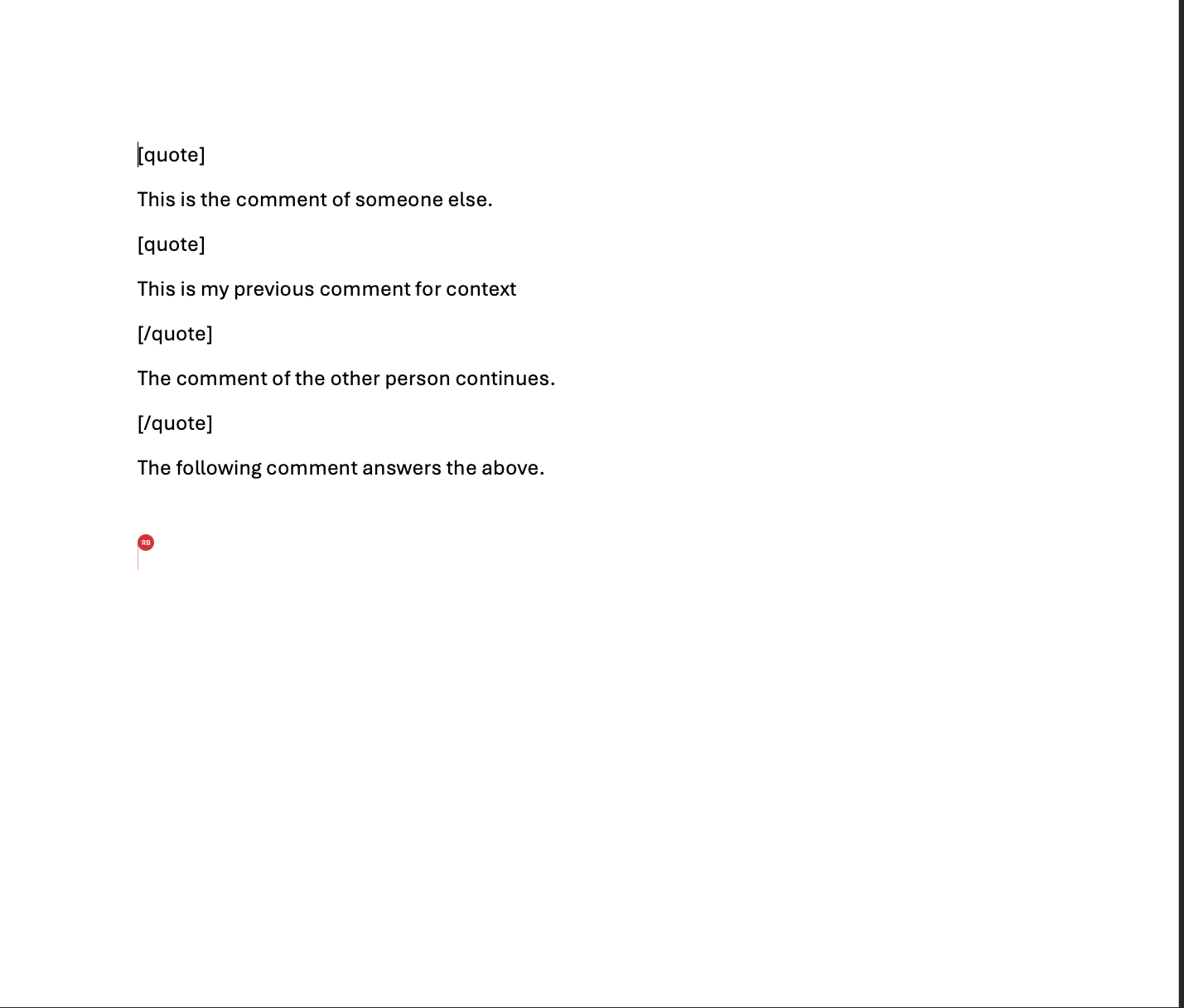
Yeah that was never going to work anyway.
You’re typing it out like that because that was the old forum software that supported [ quote ] typed out like that.
The new forum software has a Markdown editor, if you want to use it. In the forum editor, click the M / A toggle here to switch it to markdown mode
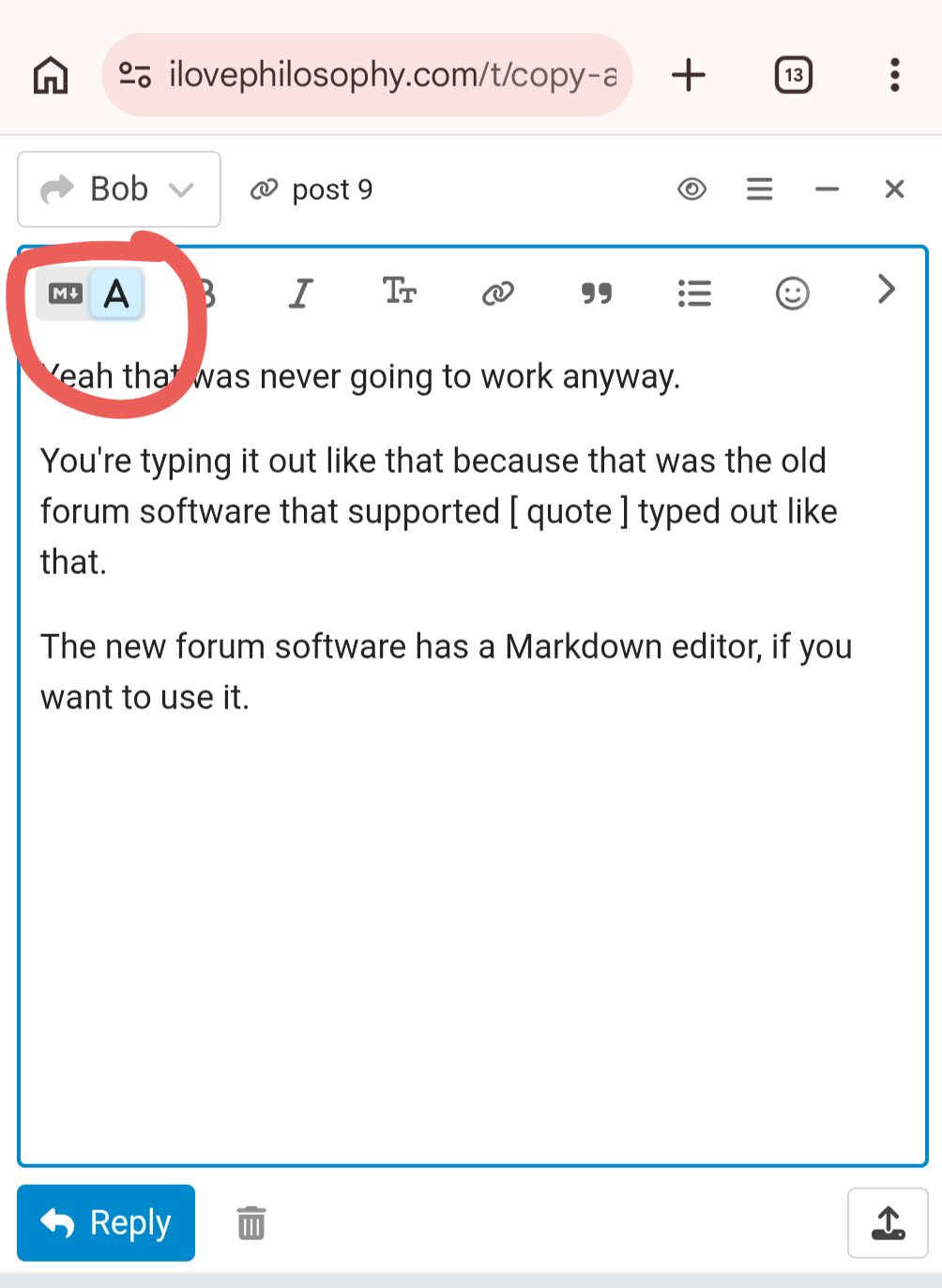
In Markdown mode, use the > symbol at the start of a line to denote the following text as a quote
1 Like
It says, use Markdown, BBCode …
Isn’t this BBCode?
Ah, it does support BB code, but when you pasted it in did you click the M/A button first? If you paste it in when A is highlighted, that’s probably why it didn’t work I think.
I think this is an interaction between Word and the WYSIWYG editor. Word is not a plaintext editor, so when you copy text from Word you’re copying a bunch of invisible formatting tags. ILP’s editor tries to interpret the pasted text, so that e.g. text tagged as italics in Word are converted to italics here.
Since the BBCode is not a formatting tag in Word, it’s treated as part of the text, and ILP’s editor treats it as such and inserts escape characters to prevent it be interpreted as formatting: [quote] becomes \[quote\].
A few solutions:
- FJ’s suggestion is best: switch to the markdown editor.
- Using a plaintext editor like Notepad instead of Word, so it isn’t copying invisible formatting.
- Use ‘Paste as plaintext’, so Word’s formatting is not included (ctrl-shift-V works on my machine, but differs by OS).
Baader-Meinhof – Meta has bee on Slow Mode for two years.
2 Likes
Because people are cowering from interlocutors under the imagined shelter of Carleas’s administrative forum.
It’s meant to be a help desk, not a discussion board.