Not a business idea, just an idea

My idea: A local everything server for family and friends.

Discourse notes:

It’s brilliant. Bastard to get it running without further containerisation, rails and gems and db migrations are always fussy bastards in my opinion, and the configuration fixes versions that don’t match what apt provides, so you need to manually fix a lot of the install, and if you’re not intimately familiar with the many web layers, then you’re in for a few frustrations.

I have a working LXC backed up with a clean install of Discourse dev, has a script that will serve http on port 4200. ufw is set up and opened, and nginx is installed and mis-configured as a reverse proxy, because it won’t ever be served outside the local net.

The image is backed up from proxmox. I don’t know how to get it running on a standard Linux host, proxmox is mostly for convenience and easy configuration.

I think it’s perfect home server fodder, you can use it to catalogue and store whatever you want, photos, documents, videos, sound files, most things, and if the internet goes down, then you have the whole lot right there, all you need is a browser, or even a phone. You can categorise stuff however you like. You can copy stuff from an existing Discourse server, and even link to specific content. You can restrict access to information and fully control user access (handy for families and multi-person households). It’s a truly amazing system to also have a local instance of, like a copy and paste everything machine, fully searchable, easy to use.

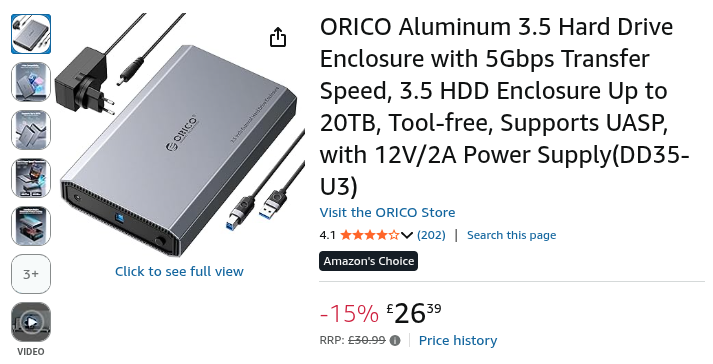
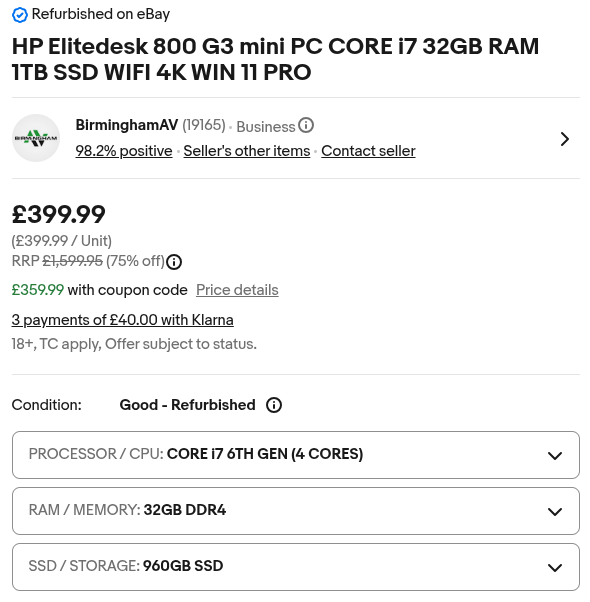
I built the whole lot for £400, a nice compact HP G3 with a healthy specced proxmox server, which is incredibly easy to work with. Machine consumes under 65W. A nice sized external USB drive, and you also have an easy, scheduled way to back up the server.

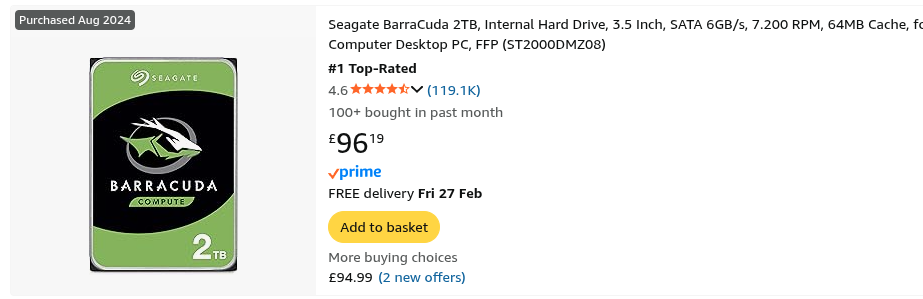
Why aren’t IT people installing these all over the place? It will take literally 5 minutes to show people the basics of Discourse, and they will love their new toy. Don’t let them be admin, unless they somehow insist, but as long as stuff is getting backed up, then it should all be cool in a SNAFU. Add an external USB drive onto the £400, and it’s a complete setup. Most routers can sit comfortably and neatly on top of the mini format PC. As long as either the box or the drive in intact, either can be restored or rebuilt, there is no SPOF.

That’s a hell of a setup for around £500 cost. I’m going to make one for my tech savvy niece, I think she will love it, if other people want one, then it is easily replicated, it uses only what configuration is need to make it work, and freely (so far, proxmox..) available software. All they have to pay is the cost of the hardware.

As far as security goes, a firewall can be built on the proxmox server which allows for VPN (Wireguard), then people can access their server securely and directly. Opnsense generates QR codes for Wireguard, so you would have to set that up for their devices on the spot, but it’s pretty easy. Maybe I should get on with that..

Like I said though, it’s only for family and friends, shouldn’t be a way to make money.

What you need:

  • @£400 computer.
  • @£100 storage.
  • Perhaps network, USB cables.
  • Under an hour for basic config and tutelage.

If anyone wants the working LXC image, I’ll upload it somewhere, that was the most time consuming thing to set up, and I defo want to avoid it again in future, although I’ll have a slightly better idea of it.

Just an idea.
+

https://pkg.opnsense.org/releases/26.1.2/OPNsense-26.1.2-vga-amd64.img.bz2

+

Pre-loaded on the backup drive:

  • OPNsense VPN ready config

  • OPNsense LXC

  • Discourse LXC

  • Instructions.txt


What you need to do:

  1. Install hardware

  2. Install proxmox / configure proxmox

  3. Import LXCs

  4. Configure and test backup, both LXC’s

  5. Configure / customise Discourse

  6. Import config OPNsense / customise?

  7. Install Wireguard local devices, add VPN users OPNsense

  8. Expose OPNsense IP to internet on router via NAT

  9. Test VPN over mobile network

  10. Set up VPN on other mobile computers, tablets, whatever

  11. Backup both LXCs, rename files to base config for household and move to a different location on the backup drive.

  12. Answer questions

2-4 can of course be done off-site beforehand.


Notes:

With the software in its current form, all of that is trivial, Instructions.txt will not be more than 2 or 3 pages long, and nothing should take much more than 10 minutes, apart from 11, which is unknowable. IPv6 should be fully supported, but I’ve never tried forwarding it, I know very little beyond the basics about setting up IPv6, but if you do, then cool.

The default disk allocation for Discourse is 32GB. This can be easily resized depending on requirements by SSH to proxmox, and then as root:

pct resize 150 rootfs 128G

For example. Of course, then backup operations will be slower as the space is filled. I tried this from 32GB to 512GB, and it went just fine, the realistic maximum for a single instance is probably about 850GB or so, but I didn’t push it that far.

The backup can run without affecting the accessibility / smoothness of the Discourse server at all. At least through what I tested.

There is plenty of room for further servers on proxmox, either another fresh Dicourse server or two, or something else. The machine can run 3 Discourse servers as set up (8GB) simultaneously, and still have resources to spare, but it might get a bit warmer if that’s prolonged, I don’t know.

The only thing you need to explain about VPN is that it’s only for use away from home, and it’s the keys to the door of the home network. The Wireguard app shows the chosen name of the VPN connection, and a single toggle to connect. Not much else at all. It can’t be simpler, and further VPNs can be added by scanning another QR code if two trusted local networks wanted to share server access. The phone icon for the web URL (192.168.1.200:4200) should function in exactly the same way, just displaying the trusted friend’s Discourse server instead of the home server.

I would advise not giving them admin access to Discourse if they are not competent learners in that regard. Too much can go wrong.. Of course, restoring from backup in proxmox is trivial, you could talk most people through it pretty easily, but you don’t really want to be doing that all the time someone wants to FAFO with the config, it can be imported via a JSON file somehow, but that wasn’t explored, and the restore from backup is healthy practice anyway, even if it takes a little longer. If they are close friends or family, you should be able to have your own VPN connection to them to easily visit their network and sort out more technical problems with the setup.

The default Discourse is basically set up for:

  • All the available local file types

  • All the available local themes

  • Max file size increased

  • Min characters decreased

Give 5 minutes for the Discourse server to come up fully.

You can SSH into the proxmox host for backup drive disaster recovery, but probably best to be careful of which drive you’re working on.. All virtual machines should be gracefully shut down first since you know they are working in that state. Then you will have to create folders again and alter fstab. The only thing that sucks is that the initial custom setup LXC images will be nuked, but they could be backed up to the cloud or even put on an external USB stick after the first config, that would avoid that problem.

You could clone the entire M.2 after initial proxmox config for quick complete disaster recovery of the host machine. Then just whap it into a new G3, restore from latest backup and off you go..

That’s all I can think of for now.

What the boffins would say about it:

Security boffins: Would have a fit. That’s pretty much what they do, look at your setup, then at you incredulously, then have a fit.

Networking boffins: Once again, fits would probably be involved. VLANS were not used, dunno why they’re needed, but they weren’t used. IPv6 isn’t implemented fully. The firewall setup is far too basic, even though it’s behind the original first line of defense. And on.

Data boffins: Would be mostly satisfied I guess, not completely, of course, but mostly.

Hardware boffins: Would probably get it, but would come up with something much better that would only cost approximately £500 more.